

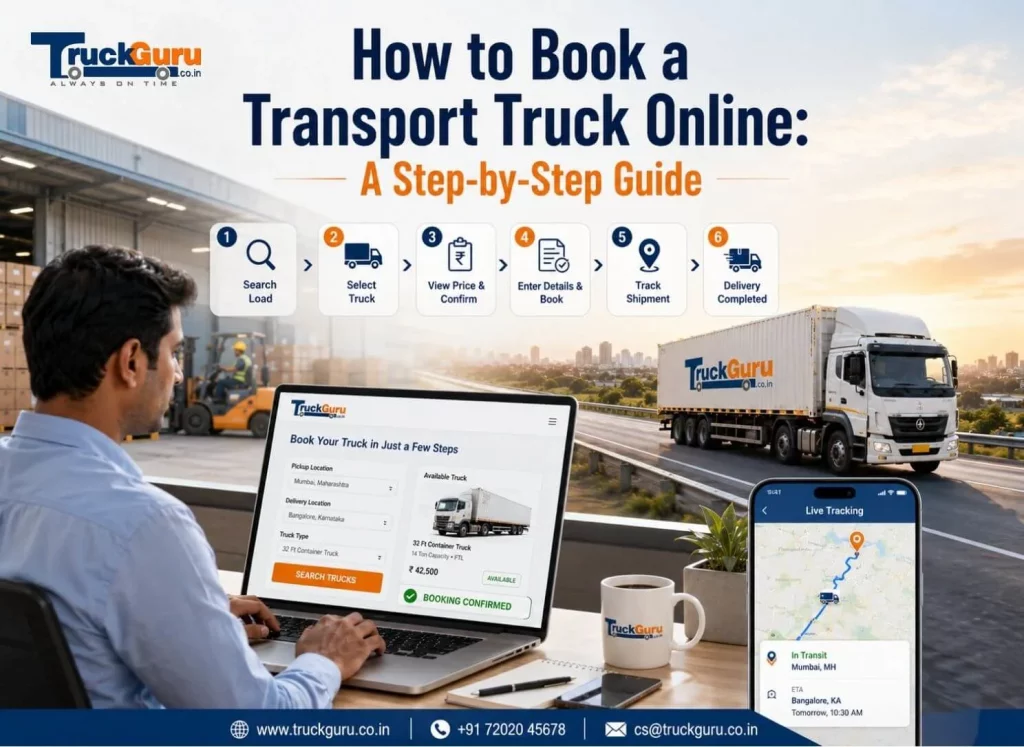
How to Book a Transport Truck Online: A Step-by-Step Guide
Booking a truck online takes about four minutes if you have your cargo details ready. Pickup city, destination, weight, truck type- confirm. The part that takes longer is knowing which truck you actually need and what the rate should be, which is where most first-time bookings go sideways.
Book Transport Truck Online: Quick Summary
Book transport truck online: Booking an FTL truck online in India, step by step. What details you need, how the rate is confirmed, what happens at loading.
Here is the process as it actually runs, and the two or three points where people get it wrong.
Before you start: get these three things straight
Cargo weight. Not an estimate, the actual figure. Booking a 14FT Eicher for what turns out to be 4.2 tonnes means the driver either refuses the load or runs overloaded, and overloaded trucks get stopped.
Exact addresses at both ends. Not “Bhiwandi” but the specific godown. Approach road matters more than distance does. A 32FT container cannot enter lanes that a Tata Ace handles comfortably, and finding that out when the truck arrives costs you a day.
Whether the consignment needs an e-way bill, above Rs.50,000 crossing a state border, it does, and the consignor or consignee generates it, not the transporter. Sort this before the truck is dispatched rather than at the checkpost.
Step 1: Enter route and cargo details
Go to truckguru.co.in or open the TruckGuru app (Android and iOS). You need pickup city, destination city, cargo type, and weight.
Be honest about the weight. Understating it to get a lower rate does not work, because the truck that arrives is sized for what you declared.
Step 2: Pick the right vehicle
This is the decision that affects your cost most, and the one people rush.
Truck | Capacity | Suits |
Tata Ace | up to 1,100 kg | Samples, spare parts, small batches |
Bada Dost | 1.5T | Retail stock, light industrial goods |
Eicher 14FT | 3.5T | Textiles, pharma, general commercial cargo |
Eicher 17FT / 19FT | 5T – 7T | Bulk FMCG, larger mixed loads |
20FT Container | 6.5T | Chemicals, pharma, sealed transport |
32FT Container | 16T – 18T | Full factory dispatches |
Booking bigger than you need is the common mistake. On a trip of about 500 km, a 20FT for 3 tonnes of cargo is indicatively Rs.20,500 – Rs.22,500, when a 14FT at Rs.15,500 – Rs.17,500 would have moved the same load.
Dimensions and load specifics on the truck size guide.
Step 3: Check the rate
The freight rate appears once you have entered the route and vehicle. Toll is included in that figure on TruckGuru. There are no promotional discounts or coupon codes on the platform, which means the rate you see is the rate everyone booking that corridor sees.
Rates are not fixed; they move with route, cargo, date and availability. On a Pune to Delhi run of roughly 1,400 km, a 14FT is indicatively Rs.43,400 – Rs.49,000 for the trip, toll included.
Indicative fares, checked October 2026. Freight rates move with route, vehicle type, cargo, date and availability. Confirm the current rate at booking.
You can check any corridor before committing on the freight calculator.
Step 4: Confirm and pay the Booking Amount
Paying the Booking Amount locks the rate and secures the vehicle. This is the point at which the number stops being an estimate.
Payment accepted by NEFT, IMPS, UPI including PhonePe and GPay, and major debit or credit cards. Cash is not accepted at any stage.
Step 5: Receive driver and vehicle details
Before dispatch, you get the driver name, vehicle registration number, and a direct contact number. Worth doing something with that: run the registration through the Vahan portal on parivahan.gov.in and confirm the fitness certificate and insurance are current.
Takes two minutes. Catches the occasional vehicle with lapsed paperwork before it becomes your delay at a checkpost.
Step 6: Loading
Pay 90 per cent of the freight before the truck departs. The Lorry Receipt generates at this point and travels with the goods.
Keep that LR. It is your proof of what was handed over, in what condition, on what date. If a damage or shortage question comes up three weeks later, the LR is the document that settles it.
Loading and unloading labour is your arrangement, not the transporter’s. Have people ready when the truck arrives, because waiting charges start from arrival time, not from when you get around to loading.
Step 7: Track and take delivery
GPS tracking runs through the Android or iOS app from dispatch. Useful less for watching the dot move and more for telling your receiving team whether to hold dock staff or send them home.
Pay the remaining balance before unloading at the destination. The GST invoice follows after delivery confirmation, with the full tax breakup your accounts team needs for input credit.
Where bookings go wrong
Four things, in rough order of how often they cause problems.
Understated cargo weight. The truck arrives sized for the declared load and cannot take what is actually there.
Unverified delivery access. Nobody checks whether a 32FT container can physically reach the destination godown until it is parked outside a lane it cannot enter.
E-way bill generated late or not at all. The consignment sits at a state border while somebody sorts out documentation that should have been done before dispatch.
Booking same-week during October to March. Capacity tightens in those months on high-density corridors. Book three to four days ahead in that window, and both the availability and the rate improve.
FAQ
How do I book a transport truck online in India?
Enter pickup city, destination, cargo type and weight on truckguru.co.in or the Android or iOS app. Select a truck type, review the rate, and pay the Booking Amount to confirm. Driver and vehicle details arrive before dispatch.
How long does online truck booking take?
Around four minutes if your cargo details are ready. The team calls back within 30 minutes during working hours to confirm pickup specifics.
What information do I need to book a truck?
Pickup and destination addresses, cargo type, accurate weight, and preferred pickup date. For consignments above Rs.50,000 crossing state borders you also need the e-way bill, generated by the consignor or consignee.
What are the payment terms?
Booking Amount at confirmation, 90 per cent at loading before the truck departs, and the balance before unloading at destination. NEFT, IMPS, UPI and cards. No cash.
How do I choose the right truck size?
By cargo weight. Up to 1,100 kg a Tata Ace, up to 1.5T a Bada Dost, up to 3.5T a 14FT Eicher, up to 6.5T a 20FT container, above that a 32FT. Booking larger than needed raises the trip fare for no benefit.
Are there discounts on online truck booking?
Not on TruckGuru. The rate is a confirmed per-kilometre figure with toll included, the same for every shipper on that corridor. No coupon codes or promotional pricing.
Can I cancel a truck booking?
Call +91-7202045678. Once driver and vehicle details have been shared, the Booking Amount is non-refundable. After dispatch, no refund applies, and fuel charges are due.
When should I book for the best rate?
Two to three days ahead on most corridors. Three to four days between October and March, when capacity tightens, and same-week booking costs more.
Check a corridor rate on the freight calculator or book online. Call 72020 45678 for anything specific.
Related Reading
- How to Estimate Goods Transport Rates: A Beginner’s Guide
- How Are Truck Transportation Charges Calculated in India?
- 6 Truck Booking Platforms Compared for FTL Freight in India: FR8, WheelsEye, Trukky, BlackBuck, Vahak & TruckGuru
For current rules and official notifications, see the Ministry of Road Transport & Highways.