

The Easiest Way for Online Truck Booking from TruckGuru Portal
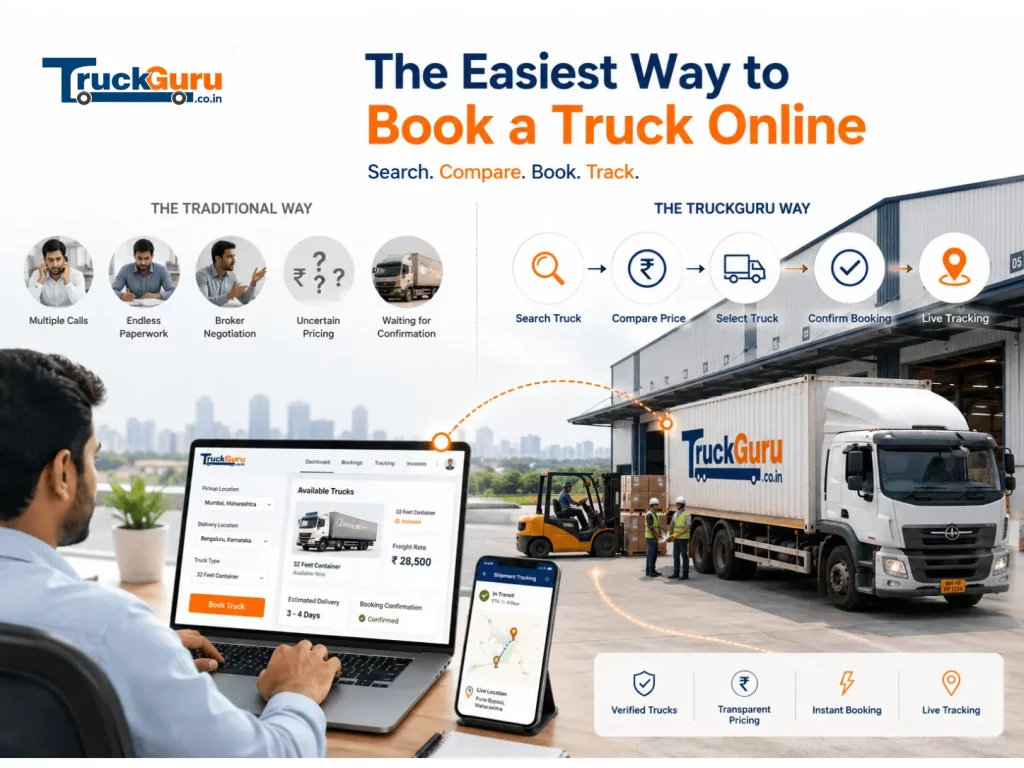
Most intercity freight in India still gets booked over a phone call. A shipper calls a broker, the broker gives a verbal rate, the truck arrives, and the rate has changed, and there is no paper trail until the delivery is done — if one gets generated at all.
Online Truck Booking: Quick Summary
Online Truck Booking: Looking for easy truck booking online? Use TruckGuru’s simple portal to find trusted, cost-effective transport solutions across India..
Online truck booking changes this in a specific way: the rate is shown and confirmed before you pay anything, the booking is documented digitally from the moment you confirm, and the truck can be tracked from dispatch to delivery. TruckGuru operates on this model for FTL (full truckload) intercity freight across 110+ cities in India.
Check a freight rate before reading further: TruckGuru freight calculator.
What Online Truck Booking on TruckGuru Means
TruckGuru is an FTL intercity truck booking platform — not a marketplace, not a comparison tool, not a broker. You book directly. One truck, one shipper, one consignment per booking. The rate shown at booking is the rate on your invoice after delivery.
What you get when you book online through TruckGuru:
- Confirmed rate before you pay — visible on the freight calculator before booking
- Digital booking confirmation with booking reference
- Driver name, vehicle number, and direct contact before dispatch
- GPS tracking from dispatch to delivery via the TruckGuru app (Android and iOS)
- Digital LR (Lorry Receipt) at loading
- GST-compliant invoice after delivery for input tax credit
How to Book a Truck Online on TruckGuru
Step 1: Check Your Rate
Go to truckguru.co.in/freight-calculator or open the TruckGuru app (Android and iOS). Enter your pickup city, destination city, and select a truck type based on cargo weight. The rate shown is per km and includes toll. This is the figure that will appear on your invoice.
Step 2: Confirm the Booking
Enter your pickup address, delivery address, and preferred pickup date. Review the total rate. Pay the Booking Amount to confirm — this secures your truck slot and triggers assignment.
Step 3: Receive Driver Details
Once confirmed, TruckGuru assigns a verified truck from the network. Before dispatch, you receive the driver’s name, vehicle registration number, and direct mobile number. The TruckGuru support team also calls to confirm pickup details.
Step 4: Loading and Dispatch
When the truck reaches your pickup location and goods are ready to load, pay 90% of the freight before the truck departs. The digital LR is generated at this point. This is your proof of handover — it confirms what was loaded, the truck details, and the route.
Step 5: Track in Transit
GPS tracking is live through the TruckGuru app (Android and iOS) from the moment the truck departs. For operations teams coordinating a receiving dock at the destination, live location and ETA visibility removes the need to call the driver every few hours.
Step 6: Delivery and Final Payment
When the truck reaches the destination, pay the remaining balance before unloading begins. The driver and receiver sign the delivery receipt. A GST-compliant invoice is generated and sent to your registered email after delivery is confirmed.
Payment Terms: Booking Amount, 90% at Loading, Balance Before Unloading
The payment structure on TruckGuru is designed around three milestones:
- Booking Amount at booking confirmation: Paid when you confirm the booking online. Secures the truck slot. Non-refundable once driver and vehicle details are shared.
- 90% of the freight at loading: Paid before the truck departs from your pickup location. The LR is generated at this stage.
- Remaining balance before unloading: Paid at the destination before goods are unloaded. Delivery receipt issued after unloading is complete.
Accepted payment methods: UPI, NEFT, IMPS, credit card, and debit card. Cash is not accepted on any TruckGuru booking.
Truck Types Available for Online Booking
TruckGuru’s online booking covers the full range of FTL commercial truck types:
- Tata Ace / Bada Dost: 750 kg to 1.5T — for smaller commercial batches
- Eicher 14FT: up to 3.5T — pharma, textiles, FMCG, engineering goods
- Eicher 17FT: up to 5T — larger batches and bulkier goods
- Eicher 19FT: up to 7T — heavy commercial and industrial freight
- 20FT Container: up to 6.5T — sealed transport for chemicals, pharma, electronics
- 32FT Container: 7/8T, 16T, or 18T — bulk factory dispatches
Full load capacity and dimension details: truck size guide.
Why Online Booking Works Better Than a Phone Call
The broker model has a structural problem: rates are verbal, revisions happen at loading, and there is no documentation trail unless you create one yourself. Disputes over damage, delay, or final billing have no paper to refer back to.
Online booking on TruckGuru addresses each of these:
- Rate certainty: The freight calculator shows your rate before you commit. Toll included. What you see is what you pay.
- Documentation from the start: Digital LR at loading, GST invoice after delivery, and booking reference from confirmation. Every stage has a record.
- Verified trucks: Every truck and driver goes through registration and document verification before listing on the platform.
- Tracking without calling: GPS tracking via the app means your operations team knows where the truck is without a phone call to the driver.
What Online Truck Booking on TruckGuru Does Not Cover
TruckGuru handles FTL intercity commercial freight only. The online booking portal does not cover:
- Local or within-city deliveries
- Household shifting or packers and movers
- Part-load (PTL) or shared truck bookings
- Vehicle transport (bikes, cars, or any automobile)
- Parcel or courier service
- Warehousing or 3PL services
FAQ
How do I book a truck online with TruckGuru?
Go to truckguru.co.in or open the TruckGuru app (Android and iOS). Enter pickup city, destination, and truck type to see the rate. Pay the Booking Amount to confirm. Driver details arrive before dispatch.
What is the payment structure for online truck booking?
Booking Amount at booking confirmation, 90% of the freight at loading before the truck departs, and the remaining balance before unloading at destination. Via UPI, NEFT, card. Cash not accepted.
Is toll included in the online booking rate?
Yes. The rate shown on the TruckGuru freight calculator includes toll. No additional toll charges are billed after delivery.
Can I track my truck after booking online?
Yes. GPS tracking is live through the TruckGuru app (Android and iOS) from dispatch to delivery. Driver contact details are also shared before pickup.
What truck types can I book online through TruckGuru?
Tata Ace (750 kg) to 32ft Container (up to 18T). Full range of FTL intercity commercial trucks. See the truck size guide for capacity and dimension details.
Does TruckGuru charge commission on online bookings?
TruckGuru charges a per-km freight rate that is shown and confirmed before booking. There is no separate commission layer — the rate on the calculator is the rate on your invoice.
Book a truck online at truckguru.co.in or check your route rate at the freight calculator.
Related Reading
- How to Estimate Goods Transport Rates: A Beginner’s Guide
- How Are Truck Transportation Charges Calculated in India?
- 6 Truck Booking Platforms Compared for FTL Freight in India: FR8, WheelsEye, Trukky, BlackBuck, Vahak & TruckGuru
For current rules and official notifications, see the Ministry of Road Transport & Highways.