

How Online Truck Booking Works for B2B Freight in India
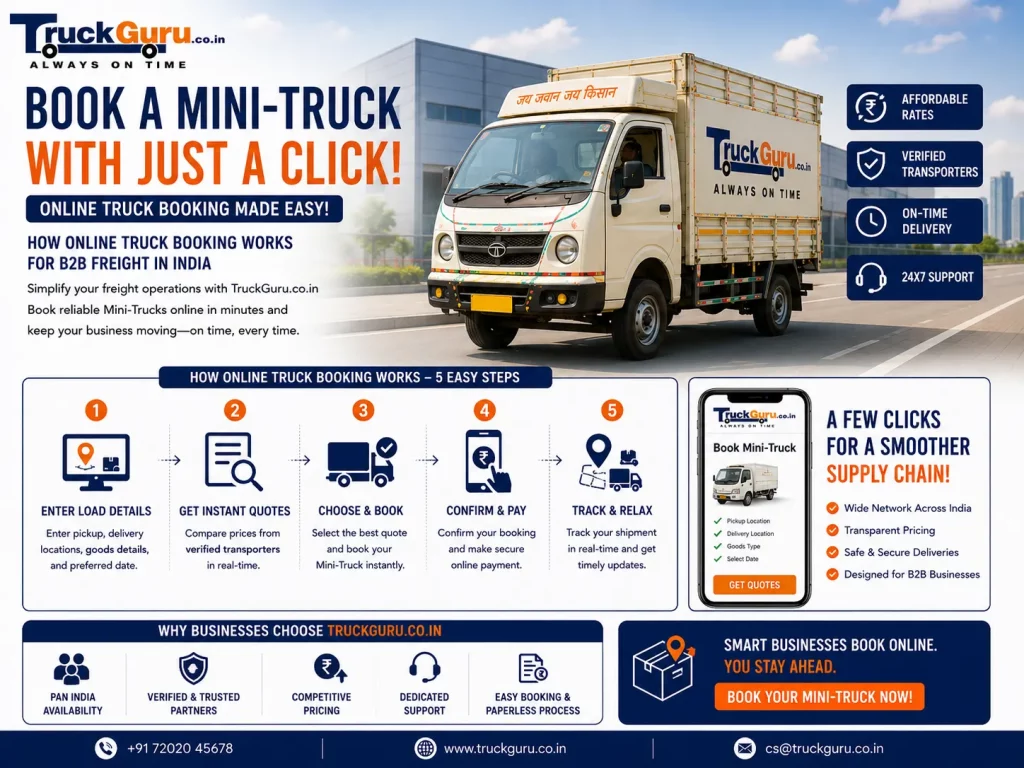
Booking intercity freight used to mean phone calls, verbal quotes that changed by invoice time, and no real way to track a shipment once it left. Digital truck booking platforms have changed that specific problem — not by adding complexity, but by removing the steps that never added value in the first place.
Online Truck Booking: Quick Summary
Online Truck Booking: Need to move goods quickly? Book a mini truck online with ease using TruckGuru’s fast and simple platform for affordable, on-demand.
This guide covers how online FTL truck booking actually works, what to confirm before a truck dispatches, and why the shift from phone-based to digital booking matters for a business that ships regularly.
Book directly at TruckGuru.co.in or continue reading to understand how the process works end-to-end.
How Online Truck Booking Works: Step by Step
Step 1: Create an account or log in
Visit the platform’s website or mobile app. New users register with a business name, contact number, and email — this takes about two minutes and is a one-time step. Returning users log in directly. Having an account means your regular pickup locations and billing details are saved, which makes repeat bookings significantly faster.
Step 2: Enter route and cargo details
Provide the pickup address, delivery address, and cargo details — primarily weight and what is being shipped. The platform uses this to show the correct truck category and calculate a confirmed rate for the route. This step is where most of the useful work happens: the system checks your cargo weight against the available categories and returns the rate before you commit to anything.
Not sure which truck fits your cargo weight? Check the truck size guide before entering details.
Step 3: Review the confirmed rate
Before you confirm a booking, you see the complete rate for the route and truck size. On TruckGuru, this is a fixed, published rate — not a quote that gets revised later. The number shown is the number on the invoice after delivery. Review it, adjust the truck size if needed, and confirm only when the rate and route details are correct.
Cross-check any route on the freight calculator independently if needed.
Step 4: Confirm the booking and arrange payment
Confirm the booking and complete the advance payment through the platform’s secure portal. TruckGuru’s standard payment structure is 5% at booking, 90% at loading, and 5% at delivery. No separate fuel surcharges, toll additions, or other line items are added after the booking is placed.
Step 5: Receive driver and vehicle confirmation
After booking, you receive the assigned driver’s name, contact number, and vehicle registration details before the truck dispatches. This is the step that separates a properly-run platform from an informal arrangement — you know who is coming and in which vehicle before it leaves, so documentation like the e-way bill can be prepared with accurate transporter details in advance.
Step 6: Track the shipment and receive digital documentation
GPS tracking gives live location visibility through the dispatch and delivery. After delivery, a digital Lorry Receipt and GST invoice are generated automatically — no chasing a paper receipt from a driver days after the fact.
Track through the TruckGuru mobile app.
What Makes Online Booking Better Than Phone-Based Arrangements
The rate is confirmed before the truck moves
In phone-based broker arrangements, a verbal quote is not a confirmed price. Rate revisions at loading time or invoice stage are one of the most common complaints in Indian trucking. A digital platform with a fixed rate card removes this problem outright — the rate is set at booking and does not change.
24/7 accessibility
Booking does not depend on a coordinator’s available hours. A shipment that needs to move on Monday morning can be booked Sunday evening without waiting for anyone to pick up the phone.
All five truck categories available to compare and book
Online booking gives immediate visibility into all available truck types and sizes — Tata Ace (750kg), Bada Dost (1.5T), 14ft Eicher (3.5T), 20ft truck (7T), and 32ft container (15T) — with the confirmed rate for each showing before you commit. No need to describe your cargo to a coordinator and wait for them to suggest a vehicle.
Transparent documentation from booking to delivery
Digital LR, GST invoice, and tracking history create a complete paper trail from the moment a booking is placed to the moment goods are delivered. For a business that needs to reconcile freight costs monthly or resolve a delivery dispute, having all of this in one place versus chasing paper records is a practical time-saving.
Explore full transportation services available on the platform.
Driver and vehicle details confirmed before dispatch
TruckGuru’s transporter network provides verified driver and vehicle details before any booking dispatches. This matters practically for e-way bill compliance — the document requires accurate vehicle registration and transporter ID, which can only be prepared correctly once those details are confirmed.
Mobile access throughout the booking
The full booking, tracking, and documentation process runs on mobile. A warehouse manager can check a truck’s live location from a phone on the dock floor rather than calling the driver for an estimated arrival time that may or may not be accurate.
What to Confirm Before a Truck Dispatches
A few checks at the booking stage prevent the most common avoidable problems:
- Cargo weight confirmed against the truck category limit — not estimated
- Pickup address can physically accommodate the truck size being booked
- E-way bill prepared with the driver’s name, vehicle registration, and transporter ID confirmed from the booking
- The delivery contact at the destination was informed of the expected arrival window
- Payment split understood upfront — 5% booking, 90% loading, 5% delivery
All of this is easier when logistics services are booked through a platform that surfaces these details at booking rather than leaving them to be sorted out at dispatch.
Closing Thoughts
Online truck booking does not solve every freight problem, but it solves the specific ones that make regular B2B shipping unnecessarily difficult: rate uncertainty, no shipment visibility, and paper documentation that takes days to arrive after a delivery is done. For a business that ships intercity FTL freight more than a handful of times a month, those are the problems worth eliminating first.
Frequently Asked Questions
How does online truck booking work for intercity FTL freight?
Enter route, pickup address, delivery address, and cargo weight. The platform shows the confirmed rate for your truck category before you commit. After booking, driver and vehicle details are assigned, GPS tracking runs through delivery, and a digital LR and GST invoice is generated at the end.
Does the truck come to my location, or do I collect it somewhere?
The truck comes to your pickup address. TruckGuru is not a self-drive rental company — a driver dispatches to your location with the vehicle. You do not travel to a depot to collect a truck.
What truck sizes can I book online on TruckGuru?
Five categories: Tata Ace (750kg), Bada Dost (1.5T), 14ft truck (3.5T), 20ft truck (7T), and 32ft container (15T). The confirmed rate for each is shown at booking before you commit.
Is the rate quoted online the final rate on the invoice?
Yes. TruckGuru uses a fixed, published rate card — the number shown at booking is the number on the invoice after delivery. No fuel surcharges, toll additions, or other line items are added later.
Can I track the truck after booking?
Yes. GPS tracking gives live location visibility through the TruckGuru mobile app from dispatch to delivery.
Call 72020 45678 or book online at truckguru.co.in to get a confirmed rate on your next intercity shipment.
Related Reading
- Reduce Manufacturing Freight Costs: India Intercity Guide
- Reduce B2B Freight Costs in India: 25 Proven Strategies
- Ship-To GSTIN Mandate August 2026 — What Shippers Must Do
For current rules and official notifications, see the Ministry of Road Transport & Highways.